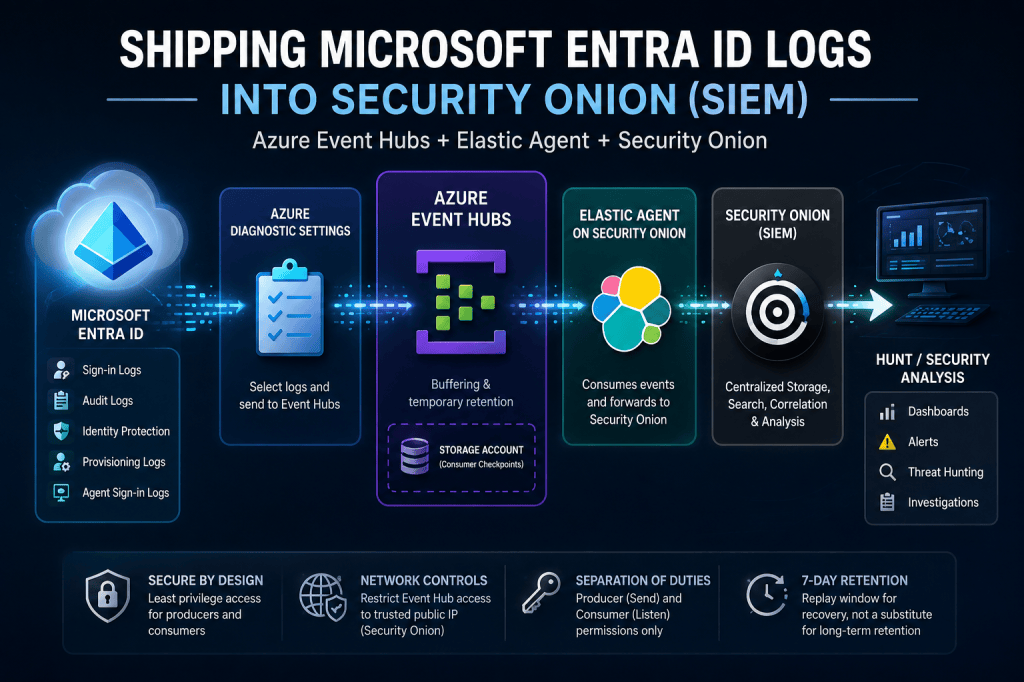
Overview
This was my first deeper dive into Azure cloud engineering. I already understood the SIEM side of the architecture, but building the Azure infrastructure forced me to learn how subscriptions, resource groups, namespaces, Event Hubs, Diagnostic Settings, RBAC, networking, and storage work together.
A SIEM (security information and event management system) is a tool that collects logs from many systems in one place so a security team can search them. Azure Event Hubs is a Microsoft cloud service that receives a stream of events and holds them for a short time until another system reads them. Least privilege means each account gets only the permissions it needs.
For this implementation, I built a logging pipeline that sends Microsoft Entra ID logging telemetry through Azure Event Hubs into an on premises Security Onion SIEM.
The goal was to build a logging pipeline capable of sending Microsoft Entra ID telemetry into Security Onion. For this implementation, I focused specifically on Entra ID logs.
Prerequisites
1- You need an active Azure Subscription.
2 -You need to have an Instance of Security Onion (SIEM) up and running.
Why Azure Event Hubs?
Simply put, the security onion Integration guide pointed me towards using event hubs to ingest Entra ID logs. I went on a two day technical deep dive learning, and looking up all the terminology used in the azure world. I learned how azure is architected where you need to set up resource groups, namespaces, azure subscriptions. I stepped into the world of Azure cloud engineering.
Event Hubs provides a natural buffer between the cloud log producer (Entra ID) and the SIEM as a consumer. Microsoft Entra ID can publish events into the Event Hub, while Security Onion can consume those events independently.
Instead of the SIEM communicating directly with Microsoft Entra ID, Event Hubs becomes the intermediary responsible for receiving and temporarily retaining the event stream.
A nice feature when using Event Hubs is that you can set up the Event Hub to retain the Entra ID logs it receives. This architecture decision provides a recovery window. I configured seven days of Event Hub retention so that a temporary interruption on the Security Onion side, would not necessarily mean immediately losing the events waiting to be consumed. I configured seven days of Event Hub retention, providing a recovery/replay window if the Security Onion consumer experienced an interruption. This should not be treated as a replacement for long-term log retention or backup
Other approaches can make sense in different environments. For example, teams using Microsoft Sentinel and Log Analytics are strong choices when the organization is already centered around Microsoft’s security and monitoring ecosystem. For me, on the other hand, I was a security onion shop.
I learned you could use the Graph API, and set up a custom Microsoft Graph-based collector, but it also introduces additional code and operational overhead. These were lessons I learned throughout the set up process.
Architecture
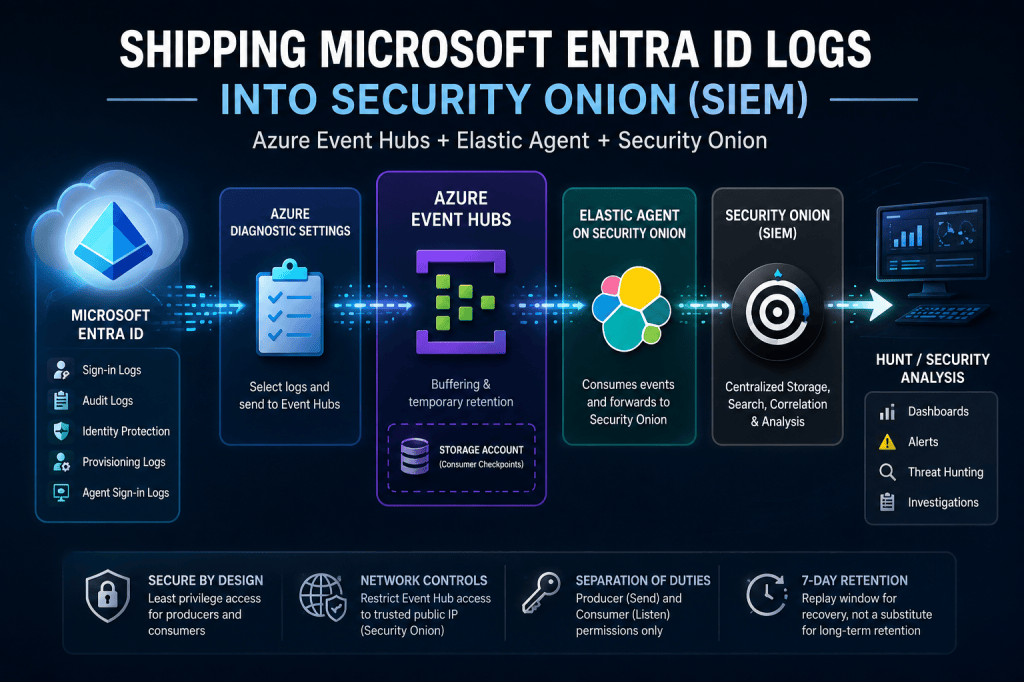
At a high level, the architecture consists of four major responsibilities.
Microsoft Entra ID is the source of identity in the cloud telemetry.
Azure Event Hubs provides the managed event ingestion and temporary retention layer.
Elastic Agent consumes the events and forwards them into Security Onion.
Security Onion provides centralized storage, search, and analysis of the resulting security telemetry.
A separate Azure Storage Account is used by the integration to maintain consumer checkpoints. It does not serve as the primary storage location for the Entra logs.
The architecture looks like this:
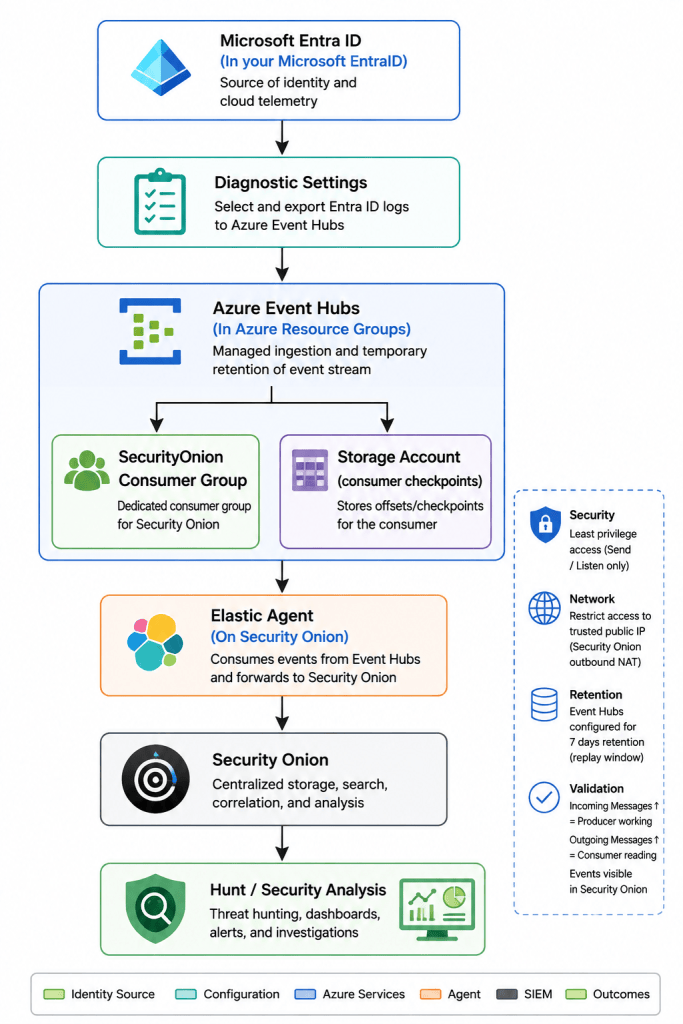
The important design principle is separation of responsibilities: Entra produces the events, Event Hubs buffers them, the consumer tracks its position, and Security Onion performs the analysis.
Security Design
One of the most important decisions was separating the permissions used by the producer (Entra ID) and the consumer (Security Onion).
I created an Entra-Sender policy with Send permission only in Azure. Security Onion uses a separate SecurityOnion-Reader policy with Listen permission only.
Neither policy requires management permissions.
This follows a simple least-privilege principle: the component sending logs should not automatically be able to read them or administer the Event Hub, and the SIEM consuming the logs should not be able to modify the messaging infrastructure.
The Security Onion connection string and Storage Account key were also treated as secrets rather than configuration values that could be freely documented or committed to source control.
Network security was another consideration.
The Event Hub namespace was initially configured from Entra ID with public access so the pipeline could be established and validated. The next hardening step was restricting access to the verified public outbound NAT address used by Security Onion.
That distinction matters.
It would be tempting to simply allow a broad organizational IP range, but that creates unnecessary exposure. The better approach is to identify the actual source address used by the SIEM and permit only the smallest required network range.
The same principle can be applied to the Storage Account where supported.
What I Chose to Collect
I focused on identity-related telemetry rather than attempting to ingest every available Azure log source.
The primary sources were:
- Microsoft Entra Sign-in Logs
- Microsoft Entra Audit Logs
- Identity Protection Logs
- Provisioning Logs
- Agent Sign in Logs
These provide useful visibility into authentication activity, administrative changes, identity risk, and identity lifecycle events.
Other Azure log sources can be added later when there is a specific operational or security requirement.
That was an intentional decision.
Collecting more telemetry is not automatically better. Additional data creates additional storage, processing, tuning, and detection requirements. The goal should be useful security visibility rather than maximum data volume. Not to mention more data, means more storage, meaning you may pay for more data storage in your Azure subscription.
At a High Level
The implementation consisted of establishing the Azure infrastructure, configuring Entra ID to publish logs, and configuring Security Onion to consume them.
I created a dedicated resource group and Event Hubs namespace, followed by an Event Hub with two partitions and seven days of retention.
A dedicated consumer group was created for Security Onion so the SIEM could independently maintain its position in the event stream.
I then configured the producer and consumer access policies, created the checkpoint Storage Account, and configured Microsoft Entra Diagnostic Settings to send the selected log categories to the Event Hub.
On the Security Onion side, Elastic Agent was configured to consume the Event Hub using the dedicated reader policy and consumer group.
The implementation details are intentionally summarized here. For those setting this up for your organization. I suggest setting up a complete operational procedure in a runbook, where exact resource names, settings, validation steps, and troubleshooting procedures can be maintained separately.
How I Validated the Pipeline
Validation was performed from both ends of the pipeline.
First, I verified that Microsoft Entra Diagnostic Settings were enabled and pointing to the correct Event Hub.
Next, I checked Event Hub metrics.
Increasing Incoming Messages indicated that Entra was successfully publishing events.
Increasing Outgoing Messages indicated that a consumer was successfully reading them.
Finally, I validated the events inside Security Onion using searches for Azure-originated telemetry and specifically for Entra sign-in and audit datasets.
Lessons Learned
The biggest lesson from this implementation was that shipping logs to a third party SIEM such as security onion from a CSP like Azure is harder than it was initially presented. It’s not an impossible task, and as of writing this article for security onion 3.2.0. If you’re not familiar with how your CSP works, I spent roughly two days working through Azure terminology and architecture before I was comfortable with how all of the components fit together. That was probably the most valuable part of the project because I wasn’t simply following a configuration guide—I had to understand what each Azure service was actually doing.
You also require having super admin on both Azure and security onion. For Azure I needed to grant myself the permission to set up resource groups and the sub resources within azure.
Another lesson learned was the network perimeter has shifted to our CSP’s. There is an option to restrict access to your Event Hub from the public internet, I highly suggest only allowing your trusted public IP.
Closing Thoughts
This implementation gave me a practical example of how cloud services, identity telemetry, and an on-premises SIEM can be connected without making the architecture unnecessarily complicated.
More importantly, it reinforced a way of thinking I want to continue applying to security engineering:
What problem am I solving? What are my options? Why did I choose this design? What are the trade-offs? How could it fail? How do I secure it? And how will I know when something breaks?
I’ve considered using Microsoft Sentinel as a SIEM, as well as CrowdStrikes SIEM in the past. Using a cloud hosted SIEM is nice because they handle the backend physical hardware such as long term storage, ram, raid storage, /NSM, not to mention upgrades, data loss retention, and backups. However, those come at a premium and while I’m setting up my SIEM locally, the skills I learned along the way make it worthwhile. Sometimes working on a third party integration teaches you more than clicking a button for a subscription and having most of it work in the background.
Bring this all together. Those questions are ultimately more valuable than memorizing the configuration of any individual technology.
This write up is a high level overview for my set up. The detailed deployment procedure should live in an engineering runbook. The architecture decisions, trade-offs, and lessons learned are what make the project worth sharing.
Related reading: Shodan Explained: What Exposed Devices Reveal Online, which also explains why a service should only accept traffic from trusted addresses.
Follow me on (X @cyb3r5parks) or feel free to leave a comment.


Leave a Reply