
Nov 25, 2024
Brief Description of The IoT Browser Shodan.io
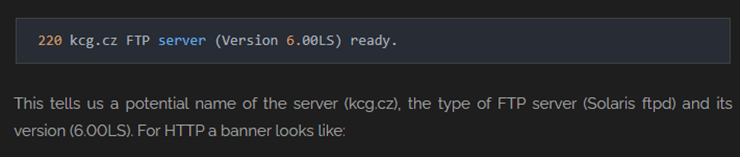
Shodan.io is a search engine for all internet connected devices. Just like you use web search engines like Google or Bing to search for websites, you can use shodan.io to search for interconnected devices. Shodan can be used to mine information on IOT devices, like IP address, location, open ports, services, device information, software details, configuration, metadata, and known vulnerabilities. Shodan indexes this information from data it takes “from banners, which are metadata about a software that’s running on a device,” as posted on the Shodan website. An example image of a banner of information indexed by Shodan with a breakdown of the indexed information. [1]
Threats Posed by IOT Devices
As more hardware and systems become connected to the internet remembering to keep those systems updated or checking to make sure those devices are not exposing any sensitive information to the external internet has fallen short. Many of the devices I found expose valuable software, or hardware intelligence about the system like the image above. Remembering to run firmware updates on IOT devices is crucial as vendors push out security updates that fix what’s exposed like the banner above. Not only banners, but they also close exposed ports or services that a shodan.io scan exposes. Threat actors can leverage Shodan and find exposed ports like port 21 for example and easily FTP into a server. Another threat vector that is not normally thought about is security departments should perform an inventory of exposed IoT devices and checking with the vendor to see if the hardware is too old (EOL) where it is longer supported. One example I found was an old industrial logic controller, where it was running windows 7, and it may be time to think about segmenting this device on a separate network or decommissioning or replacing it all together.
Summary of The Exposed Devices Found on Shodan.io
- Personal computers
- Printers, webcams.
- Networking equipment
- Routers, switches, and firewalls.
- Servers:
- Web servers, database servers, and mail servers.
- IoT devices
- Cameras, smart TVs, printers, and thermostats.
- SCADA/ICS systems
- Industrial control systems, power grid equipment, and water treatment plants.
- VoIP devices
- SIP servers and PBX systems.
- Medical devices
- Imaging systems, monitors, and hospital equipment.
- Security systems
- Surveillance cameras and their controlling hub.
The above list is the type of equipment I found during my searches. My searches spanned a wide array of cities from San Francisco CA, San Jose CA, and Austin Texas. I found insecure home webcams, where you can see someone’s living room. I also found exposed city street light controller where you could see the cars passing by and there was a login screen. Interestingly, when I searched the three cities separately, I got back 120 exposed devices for San Jose, 43 for San Francisco and a whopping 175,422 devices for Austin. I noticed that most of the Silicon Valley cities had minimal exposure where many servers pointed to Cloudflare. In Austin specifically, I found a MicroLogix 1400 Programmable Logic Controller System, where this controls material handling, pharmaceutical, SCADA systems.A quick google search of the device and I was able to find what this device was. [2] This MicroLogix device exposed valuable information like its private IP address, Vendor ID, serial number, open ports, and you could easily access the device if you input the URL or IP in your browser. Another search revealed an exposed 2016 Windows server for a small healthcare provider which had port 3388 RDP enabled.
The Threats and Vulnerabilities for Devices Found
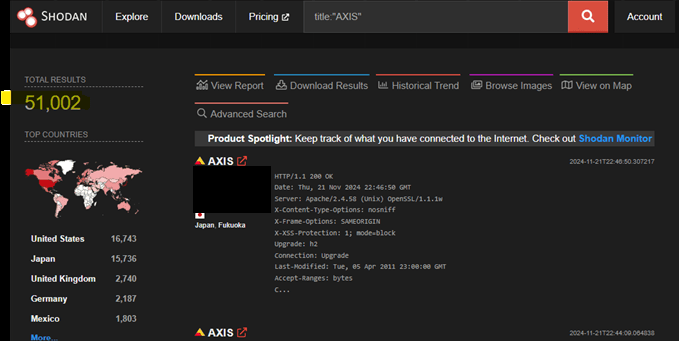
The most notable threat I found was searching for term AXIS traffic management equipment. [3] The by entering the search parameters title:”Axis” revealed 51,002 devices spread out across the world, however mostly concentrated in the USA, Japan, UK, Germany and Mexico as seen in the screenshot below. These devices are vulnerable to anyone navigating to them and guessing their login credentials. This is a low barrier of entry where anyone with a minimal amount of IT networking equipment knowledge can guess the login credentials.
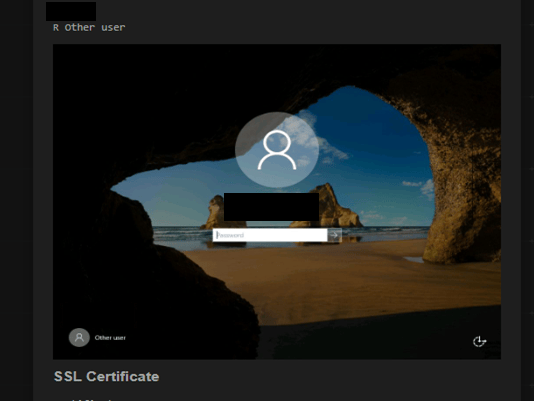
Other notable threats I found where exposed ports on webservers and services that could be exploited. The MicroLogix previously mentioned exposed it was using port 44818, which is an older tcp/udp port which an attacker could launch a DDOS attack against directly. [4] I did not go further into logging into the device to see what it controls, but one should not expose this type of equipment to the public internet if it handles or touches a cities infrastructure. Another notable find was an exposed what appears to be a small healthcare provider’s IT department’s Windows 2016 server, as seen in the screenshot below. This webserver has an open port for 3388, which through a little bit of research revealed to be a protocol that allows RDP. [5] There is also a known trojan horse vulnerability where if infected a “trojan opens a backdoor and runs a proxy server,” according speedguide.net. [6] One result appeared to be a small healthcare provider’s Windows Server 2016 machine with remote desktop open to the internet. I did not try to log in. A finding like this should be reported privately to the owner, not published.
Methodology Used to Generate This Report
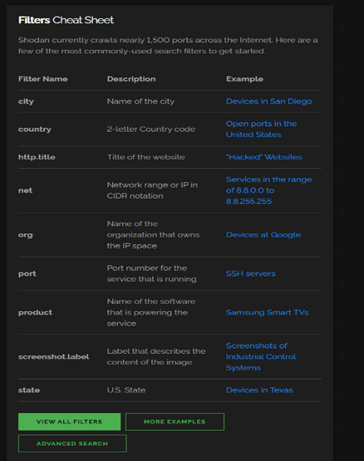
Luckily, I was given a this shodan.io tutorial which is a good 10-minute read. [7] After being perplexed I created an account on the website and proceeded to click around. How I build my search query’s. It’s like writing an SQL query where I built my filters using the cheat sheet posted on the Shodan front page, see screenshot below. [8] Methodology continued below.
I chose the two following metropolitans in California San Francisco, San Jose, and Austin Texas and ran the search queries posted in the following Shodan Search Results section below.
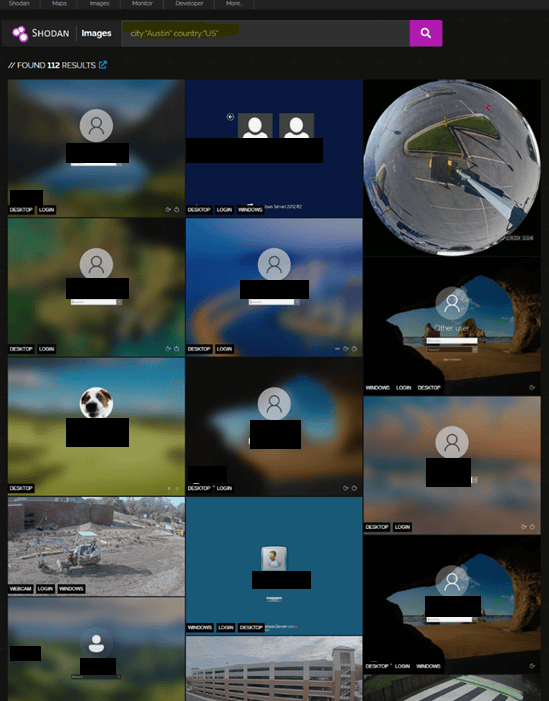
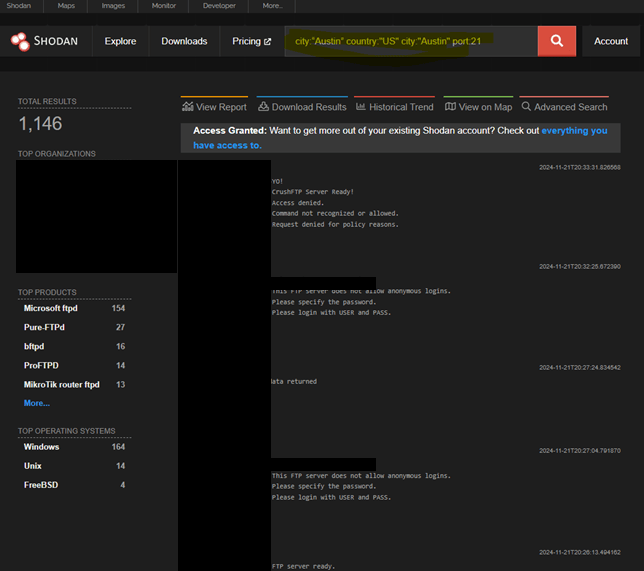
This search targeted the city of Austin and shows us screenshot of exposed windows servers, and a construction site webcam. The following search below also targeted the city of Austin where I filtered out for devices exposing port 21. The results where 1,146 total devices left open to using the FTP protocol, see screenshot below for full search parameters and list total list of devices found. Notably, when you open some of the search results in the screen shot below, shodan.io also shows you potential CVEs related to your open ports and services.
Used Shodan Search Results
- Search for exposed devices in Austin Texas.
- Shodan query: city:“Austin” country:”US”
- Search for port 21 in Austin: city:“Austin” country:”US” city:”Austin” port:21 –
- Search for Austin images: city:“Austin” country:”US”
- Search for exposed devices in San Francisco California.
- Shodan query: city:“San Francisco” country:”US”
- Search for exposed devices in San Jose California.
- Shodan query: city:“San Jose” country:”US”
- Global Search for the AXIS City Street Light equipment.
- Shodan query: title:”AXIS”
Report Conclusion
In summary, shodan.io is a new tool for monitoring and managing the exposure of all your internet connected devices. It also shows you what ports and services you have exposed, where you might want to close a port on your firewall you did not know you had exposed. I also showed MicroLogix device which appears to be a critical infrastructure device for Austin Texas. I also found the easy to log into AXIS traffic management equipment controllers with a Total 51,002 devices spread out across the world. I also found an exposed 2016 windows server for a small healthcare provider with an open RDP protocol, leaving them wide open for an attack.
When comparing the three metropolitan cities I used the Shodan tool on. San Francisco had 43 exposed devices and San Jose California had a total 120 exposed devices. When comparing the two versus the number of exposed devices I found for Austin Texas 175,422 exposed devices. Austin Texas has a greater number of devices we can easily identify as needing to Be Secured so I recommend expanding the Be Secure consulting portfolio to the Austin Texas market. If you made it this far, Be Secure is a fictional consulting firm I wrote about for a class.
All findings are shown in general terms. I did not access any device, and identifying details have been removed.
Bibliography
| [1] | shodan.io, “shodan.io,” 19 November 2024. [Online]. Available: https://help.shodan.io/the-basics/what-is-shodan. [Accessed 2024]. |
| [2] | Rockwell Automation, “Rockwell Automation,” Allen-Bradley, November 2024. [Online]. Available: https://www.rockwellautomation.com/en-us/products/hardware/allen-bradley/programmable-controllers/micro-controllers/micrologix-family/micrologix-1400-controllers.html. [Accessed 2024]. |
| [3] | AXIS Communications, “The road to smarter traffic management,” [Online]. Available: https://www.axis.com/en-us/solutions/traffic. [Accessed 2024]. |
| [4] | Speedguide.net, “Port 44818 Details,” November 2024. [Online]. Available: https://www.speedguide.net/port.php?port=44818. |
| [5] | https://superuser.com/questions/1089630/remote-desktop-will-not-connect-on-port-3388, “Remote Desktop will not connect on port 3388,” StackExchange, 2016. [Online]. Available: https://superuser.com/questions/1089630/remote-desktop-will-not-connect-on-port-3388. [Accessed November 2024]. |
| [6] | SpeedGuide.net, “Port 3388 Details,” SpeedGuide.net, 1999-2024. [Online]. Available: https://www.speedguide.net/port.php?port=3388. [Accessed November 2024]. |
| [7] | Unsupervised Learning, “A Shodan Tutorial and Primer,” 13 June 2014. [Online]. Available: https://danielmiessler.com/p/shodan/. [Accessed 2024]. |
| [8] | Shodan.io, “Dashboard,” [Online]. Available: https://www.shodan.io/dashboard. [Accessed 2024]. |


Leave a Reply